Production Application Deployment
We are going to use a GitLab CI/CD pipeline to deploy our application in a push fashion to our production k8s cluster in Azure. Switch back to the main branch and review the files in prod-cluster/deploy folder. They look very similar to the yaml definition files in the staging directory.
There are a few differences though. When your OpenShift accounts were provisioned, it automatically created you a namespace to work in. For Azure we must create a namespace as our first step using the namespace.yaml file.
OpenShift has the concept of routes, which makes accessing your application using wildcard DNS and wildcard TLS certificates very easy. Standard k8s instead uses an ingress definition in conjunction with a load-balancer. A Nginx load balancer has been deployed into the Azure cluster to facilitate the ingress.
CI/CD Review
Select the gitlab-ci.yaml file in the root of the repository to review the CI/CD pipeline. The third phase, production is used to deploy the application to Azure. Notice the when: manual line in the production phase. This is going to require us to manually approve the change.
Review the deploy_prod.sh script.
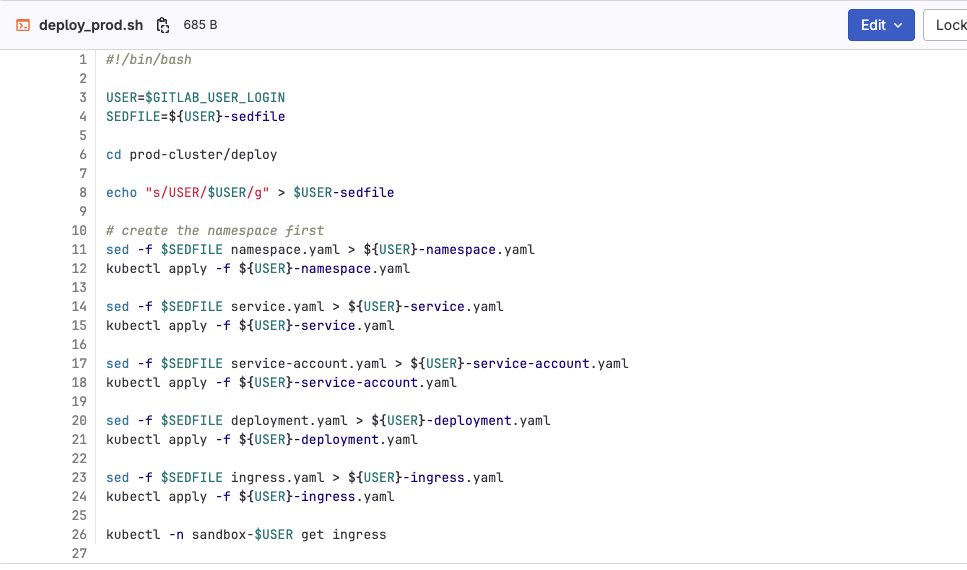
The script updates the files in the deploy folder for your USER value by using sed to make the changes. The script creates the namespace first since it’s required for all other components. It then creates all other components in order. The last command is going to output the value of the ingress that is created.