Extension: Configuring NetApp Trident
Before storage can be dynamically provisioned a storage class and the matching container storage interface CSI must be deployed to the cluster. This is typically performed once for the entire cluster and centrally managed by systems administrators. For the purpose of this lab we have already deployed the Trident CSI, the documentation outlining that process can be found here.
Once the CSI has been created we will need to configure a tridentbackend. This tells Trident how to connect to the NetApp backend and what type of volumes to provision. A single Kubernetes cluster can have multiple tridentbackends, each of which can be used to create a Storage Class.
Note
A detailed discussion of each of the trident objects is available at https://docs.netapp.com/us-en/trident/trident-reference/objects.html.
In order to configure this we’re going to need to create a few Kubernetes objects. To get started click the quick create button the select import yaml:
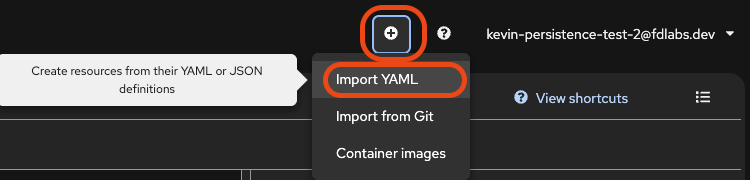
We’ll start by creating a TridentBackendConfig object that will allow Trident to connect to the ONTAP backend. We’ll paste the TridentBackendConfig below in and hit create then repeat the process for the StorageClass.
And we’ll also create a new StorageClass that will use the tridentbackend we just created.