Ansible inventory for the F5
Navigate back in the repo by selecting Code and then Repositories. Drill down into the inventories and then staging directory an select the hosts file to view the ansible inventory file.
Next drill into the group_vars and then f5 directory. Select secrets.yml to view the encrypted ansible vault file. Next, select all.yml to view the desired F5 configuration.
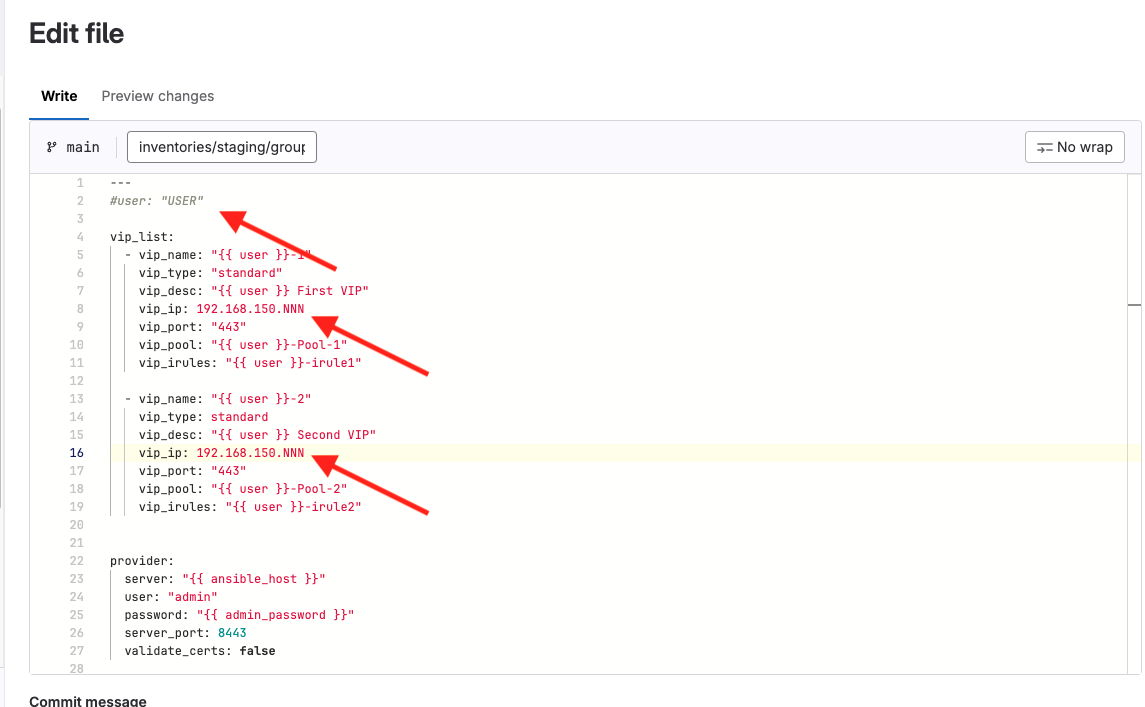
Edit the file.
Uncomment the #user line at the top of the file and change the USER value to your username.
Next, in the vip_list: section change the vip_ip: in both definitions to the value provided by Flywheel.
 Commit the changes.
This will run the pipeline and should give the same results as the last run.